Generating Furina-Style Speech With CosyVoice3 On Arc B50 And Quadro M4000
This started as a simple automation idea: collect LLVM and HPC news, summarize it, and have a Furina-style voice read the result aloud.
The text side was not the interesting part. The hard part was making CosyVoice3 generate that audio on the right GPU.
There were two very different targets:
- Intel Arc Pro B50, where the goal was to use the current upstream PyTorch XPU path instead of Intel Extension for PyTorch or an older Intel-specific fork.
- NVIDIA Quadro M4000, an old Maxwell GPU, where the goal was to find the newest CUDA stack that still includes kernels for compute capability 5.2.
Both runs had to end with a real WAV/OGG file, and both had to prove that the core PyTorch model inference happened on the GPU rather than silently falling back to CPU.
This post is the final runbook. It assumes a fresh Ubuntu 26.04 system, internet access, Docker or normal host install privileges, and one of these GPUs installed. The Arc B50 path is the primary path. The M4000 path is included because old NVIDIA cards have a different failure mode: the newest driver can still run a wheel whose user-space CUDA stack no longer contains code for the GPU.
One practical note before the commands: the verification used a public Furina English sample as the prompt voice. That is fine for a personal lab run. If you publish generated audio, replace the prompt with voice data you have the right to use.
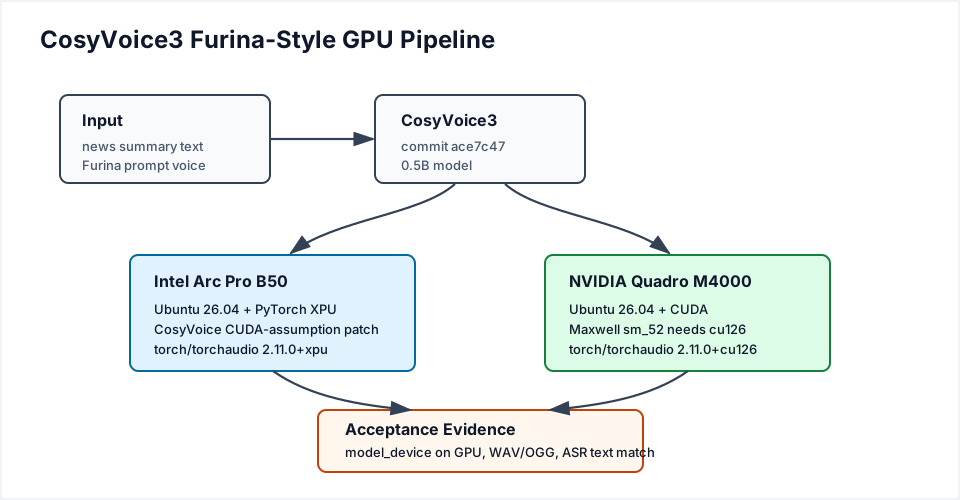
Figure 1. The problem was not just text-to-speech. The working system had to choose the correct GPU stack, patch or avoid framework assumptions, generate audio, and prove that model inference used the accelerator.
The Artifacts In This Post
The exact final engineering bundle lives outside this blog repository, but this post includes the small reusable pieces needed to reproduce the run:
- cosyvoice-arc-xpu.patch
- resolve_xpu_stack.py
- requirements-xpu-latest.in
- requirements-cuda-cosyvoice.in
- check_xpu.py
- check_cuda.py
- download_model.py
- setup_furina_voice.py
- generate_furina.py
- asr_sanity_check.py
The two device-check attachments, check_xpu.py and check_cuda.py, are intentionally included as source files in this page bundle so the verification commands below can be run directly after the download loop.
In the commands below, download those files into a local assets directory:
| |
If you are reading the source checkout instead of the deployed site, set FURINA_ASSETS to the page-bundle directory that contains those files.
Common Ubuntu 26.04 Setup
Start with a physical Ubuntu 26.04 host. Install the common tools first:
| |
Install Docker if you want to reproduce the container verification path:
| |
Log out and back in so group membership applies, then verify Docker:
| |
The rest of the post uses normal host virtual environments. The verified engineering bundle also ran these paths in Ubuntu 26.04 Docker containers, with /dev/dri passed through for Intel and /dev/nvidia* plus host driver libraries passed through for NVIDIA.
Arc Pro B50: Host Runtime
On Ubuntu 26.04, the Intel user-space runtime packages are available directly from the distro repositories. Install them:
| |
Log out and back in, or reboot. Then verify that the GPU device and permissions are visible:
| |
The important facts are:
/dev/dri/renderD*exists.groupsincludesrender.clinfoshows an Intel GPU device.
On the verified host, PyTorch later reported:
| |
Arc Pro B50: Clone And Patch CosyVoice
Create a clean workspace:
| |
The patch is the key B50-specific change. CosyVoice is mostly CUDA-oriented upstream. The patch does not try to make every optional accelerator feature work on Intel GPU. It does something narrower:
- choose
xpuwhen CUDA is unavailable andtorch.xpu.is_available()is true; - replace CUDA-only autocast, stream, synchronize, cache, and seed calls with device-aware helpers;
- keep TensorRT and vLLM disabled on non-CUDA devices;
- keep ONNX frontend sessions on CPU where needed;
- move the PyTorch CosyVoice model weights and tensors to XPU.
That split matters. Text normalization, ONNX frontend work, file I/O, and WAV writing can remain CPU-side. The required condition is that the main PyTorch model inference runs on XPU.
Arc Pro B50: Python And PyTorch XPU
Install uv and use Python 3.12 for the verified Ubuntu 26.04 lane:
| |
Resolve the newest matching torch and torchaudio pair from the official PyTorch XPU wheel index:
| |
The resolver matters because the latest torch wheel is not enough by itself. CosyVoice uses the PyTorch audio stack, so torch and torchaudio should be version-aligned.
During verification on June 3, 2026, the XPU index had this shape:
| |
So the correct choice was not “install the biggest torch version number.” The correct choice was “install the newest matching torch/torchaudio XPU pair.”
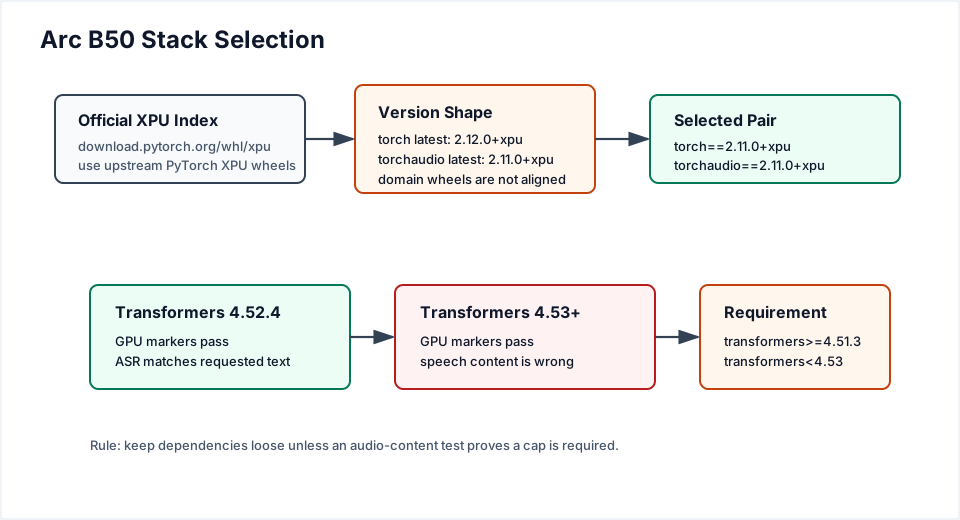
Figure 2. The B50 path is conservative only where evidence forced it. PyTorch XPU stays on the newest matching domain-wheel pair, while Transformers is capped because newer versions produced wrong speech despite valid GPU markers.
Now prove XPU is usable before loading CosyVoice:
| |
Required markers:
| |
PYTORCH_ENABLE_XPU_FALLBACK=0 is important. It disables silent unsupported-op fallback from XPU to CPU. If the later generation works with this set, the run is much harder to misread.
Do not use plain pip install torch torchaudio from PyPI for the B50 setup. In the Ubuntu 26.04 negative control, plain PyPI installed a CUDA build:
| |
The conventional upstream PyTorch path for this Intel GPU is the official XPU wheel index:
| |
Arc Pro B50: Model And Prompt Voice
Download the CosyVoice3 model:
| |
The model is about 9 GB.
Extract the prompt voice:
| |
The helper uses Hugging Face dataset NaruseShiroha/Genshin-Furina-English, parquet file data/train-00000-of-00002.parquet, row 20. It writes:
| |
CosyVoice3 generation uses prompt.wav and prompt.txt directly. There is no spk2info.pt speaker registration step in this runbook.
Arc Pro B50: Generate Audio
Generate from inline text:
| |
Generate from a text file:
| |
Convert the WAV to a Telegram-friendly OGG:
| |
The generation run must print these GPU markers:
| |
On the verified B50 Docker lane, the evidence was:
| |
The Transformers Trap
The most deceptive failure in this project was not a hard crash.
Several dependency combinations produced all the right GPU markers and generated an audio file, but the speech was unrelated to the input text. It sounded a little like the target voice, but it was semantically broken.
That is why the working requirement file keeps most dependencies loose but caps Transformers:
| |
The boundary test looked like this:
| |
The lesson is simple: for generative audio, “the GPU ran” is necessary evidence, but it is not sufficient evidence. You also need a content sanity check.
Run Whisper ASR on the generated WAV:
| |
The verified good run transcribed as:
| |
The failed loose-dependency run transcribed as unrelated text. That made the regression obvious even though the GPU markers were valid.
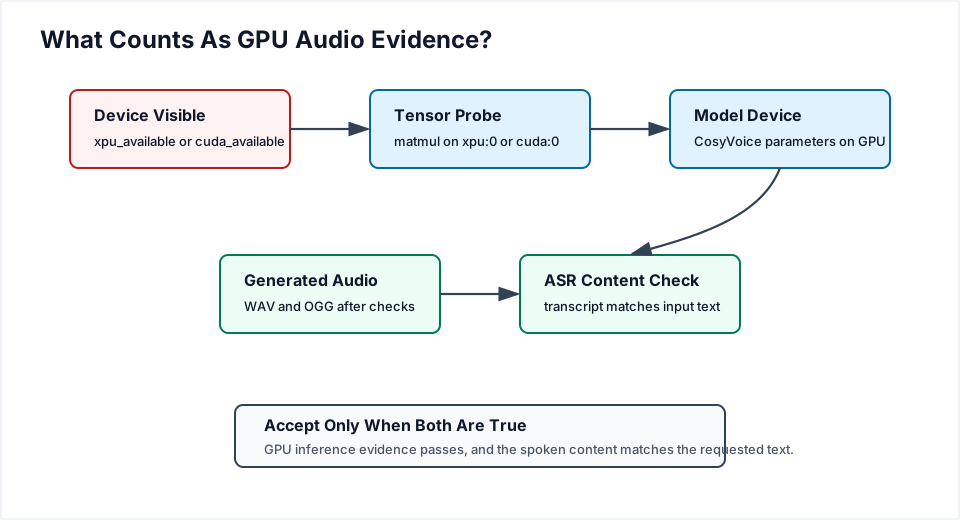
Figure 3. A reliable audio run needs two kinds of evidence: accelerator execution and semantic audio content. Device visibility alone is not enough.
Quadro M4000: Why The Newest CUDA Stack Fails
The M4000 path is shorter because CosyVoice does not need a source patch on CUDA. The hard part is choosing a wheel that still supports Maxwell.
The Quadro M4000 is compute capability 5.2. The host can run a recent R580 driver, and nvidia-smi may report a high CUDA compatibility level, but that does not mean every PyTorch wheel contains sm_52 kernels.
The tested stack matrix was:
| Stack | Result |
|---|---|
Plain PyPI torch 2.12 / CUDA 13 packages | Fails: wheel supports newer architectures, M4000 gets no kernel image is available |
torch==2.11.0+cu128, torchaudio==2.11.0+cu128 | Fails: supports sm_75+, M4000 is sm_52 |
torch==2.10.0+cu128, torchaudio==2.10.0+cu128 | Fails: supports sm_70+, M4000 is sm_52 |
torch==2.11.0+cu126, torchaudio==2.11.0+cu126 | Passes: arch list includes sm_50 |
torch==2.10.0+cu126 | Passes, but older than the selected 2.11 pair |
So the selected M4000 stack is:
| |
torchcodec is capped because the latest TorchCodec line tried during the investigation pulled CUDA 13-linked libraries and failed against the cu126 stack. Prompt WAV decoding does not need GPU execution, so a compatible TorchCodec line is enough.
Quadro M4000: Host Setup
Install base tools:
| |
Install an R580 NVIDIA driver:
| |
After reboot:
| |
Expected facts:
| |
Quadro M4000: Install And Generate
Clone CosyVoice:
| |
Create the Python environment:
| |
Verify CUDA:
| |
Required markers:
| |
Download the model and extract the same prompt voice:
| |
Generate audio:
| |
Required generation markers:
| |
On the verified M4000 Docker lane, the CUDA probe reported:
| |
The generation verifier reported:
| |
The ASR sanity check matched the requested text:
| |
Why The Proof Is Solid
For both GPUs, the verifier uses a ladder of checks:
- The driver exposes a GPU device.
- PyTorch reports the accelerator as available.
- A real tensor operation runs on the accelerator.
- The loaded CosyVoice model parameters are on the accelerator.
- The generated WAV and OGG are written after those checks.
- Whisper ASR confirms that the spoken content matches the requested text.
The model-device check is the critical one:
| |
That value is read from real CosyVoice model parameters after loading the model. It is not a wish from an environment variable.
The tensor probe is also real:
| |
That comes from allocating tensors on the target device, running matrix multiplication, synchronizing, and copying the result back.
For Intel, PYTORCH_ENABLE_XPU_FALLBACK=0 makes this stricter by preventing unsupported XPU operators from quietly falling back to CPU.
Conclusion
The final Arc B50 setup is surprisingly clean once the failure modes are separated:
- Ubuntu 26.04 has the Intel runtime packages needed for Level Zero/XPU visibility.
- The upstream PyTorch XPU wheel index is the right PyTorch source.
- The newest matching XPU
torch/torchaudiopair is safer than the newesttorchalone. - CosyVoice3 needs a small CUDA-assumption patch to run its PyTorch model path on XPU.
transformers<4.53is required for semantic audio correctness, not GPU availability.- GPU proof needs model-device and tensor-probe evidence, not just
xpu_available=True.
The M4000 result is the opposite lesson. CUDA was already the native path for CosyVoice, but old Maxwell hardware cannot use the newest CUDA wheels just because the host driver is new. The newest working stack found here is PyTorch 2.11 with cu126, because it still includes Maxwell-compatible kernels.
So the practical rule is:
- for Arc B50, use upstream PyTorch XPU and patch CosyVoice’s CUDA assumptions;
- for Quadro M4000, use the newest CUDA wheel family that still contains
sm_50kernels; - for both, keep the Transformers cap until a full ASR-backed generation run proves a newer version speaks the requested text.
That is the difference between “it produced a sound” and “it produced the right voice, saying the right words, on the GPU I intended to use.”
References
- PyTorch XPU guide: https://docs.pytorch.org/docs/stable/notes/get_start_xpu.html
- PyTorch
torch.xpuAPI: https://docs.pytorch.org/docs/stable/xpu.html - PyTorch previous-version install commands: https://pytorch.org/get-started/previous-versions/
- Intel GPU setup: https://dgpu-docs.intel.com/driver/client/overview.html
- Intel GPU hardware table: https://dgpu-docs.intel.com/devices/hardware-table.html
- NVIDIA CUDA Toolkit, driver, and architecture matrix: https://docs.nvidia.com/datacenter/tesla/drivers/latest/cuda-toolkit-driver-and-architecture-matrix.html
- CosyVoice repository: https://github.com/FunAudioLLM/CosyVoice
- CosyVoice3 model: https://huggingface.co/FunAudioLLM/Fun-CosyVoice3-0.5B-2512
- Furina English prompt dataset: https://huggingface.co/datasets/NaruseShiroha/Genshin-Furina-English